
How To: Using Enum4Linux to Enumerate Information from Windows & Samba Systems.
Published:
🛠️
What is enum4linux?
Enum4Linux is a tool that allows you to enumerate information from Windows and Samba systems. Samba is an open-source implementation of the Server Message Block (SMB) protocol for Unix systems (Robert Sheldon, no date). The Samba platform allows communication between Unix and Windows hosts on a network. This allows Unix hosts to access Windows file and print services and is a vital component in integrating Linux/Unix servers into Active Directory environments (Samba, no date).
Enum4linux is built around the Samba tools suite to enable penetration testers to retrieve information about a target system including its operating system, group membership information, workgroup, or domain membership and even password policy retrieval all using one tool. It attempts to replicate the functionality of enum.exe on Windows machines. (Kali, 2023).
What will this tutorial cover?
In this tutorial, I will cover the concepts of why using a tool like enum4linux is important in the reconnaissance phase of a penetration test. I will show you how to access enum4linux and install it on Kali (if it has not been pre-installed on your system). I will also use the Basic Pentesting box from TryHackMe to demonstrate the tool and its numerous different settings.
What is Enumeration?
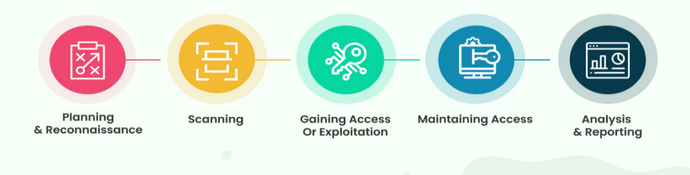
*Figure 1: The 5 penetration testing stages.* (Cyril, 2023).
In a penetration test, there are 5 stages. The first stage, planning and reconnaissance is as important as any other. During this phase, the scope of the test is defined as well as the goals that the test aims to achieve. From this, the tester can begin what is referred to as reconnaissance, this involves gathering intelligence about the target, such as network information, to greater their understanding and work out potential weaknesses in a target.
Enum4linux allows a pentester to extract valuable information about a potential target, such as operating system information, network infrastructure or hostnames for specific devices that may produce a weakness that can be exploited.
There are several different forms of enumeration. To learn more about these types, I refer you to this article by EC-Council https://www.eccouncil.org/cybersecurity-exchange/ethical-hacking/enumeration-ethical-hacking/.
Legal and Ethical Issues.
It is important to note that using tools such as enum4linux on targets that you do not have explicit permission to do so is considered a crime punishable under most countries laws. Depending on where you are in the world will depend on the severity of the sentence should you act without consent when using tools of this nature, any “hacking” tool should be treated with respect and it is important to understand the technical details before putting them to use.
In the United Kingdom, the Computer Misuse Act 1990, was introduced to handle incidents where people use computer systems to gain unauthorised access to private data, unauthorised access with the intent to damage, and unauthorised access to impair or restrict the operation of a computer. (Computer Misuse Act 1990). There are plenty of online and offline testing environments where you can operate these tools without infringing on ang legal issues.
This also takes into consideration the ethical guidelines we must follow as security professionals. If you have been given permission to use these tools on a network then you must still think about whether it is ethical to do so. Be responsible and maintain clarity when engaging with another person’s computer systems.
Installing enum4linux.
If enum4linux did not come preinstalled with your version of Kali Linux, you can install it and its dependencies using this command.
sudo apt install enum4linux
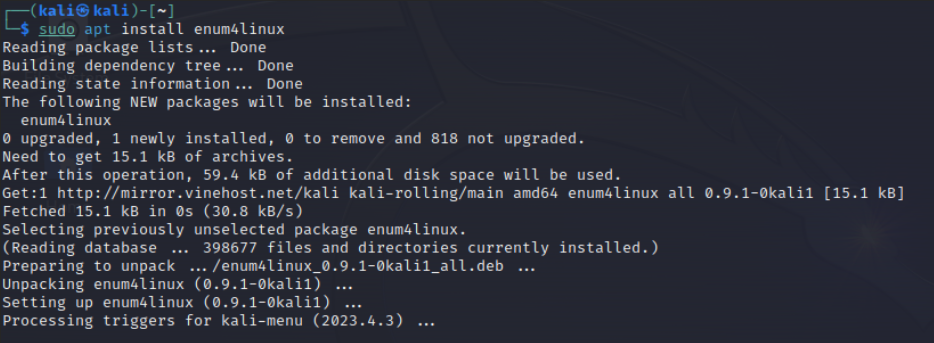
*Figure 2. Screenshot from Kali Linux showing installation of enum4linux.*
Using enum4linux.
Accessing the help pages for enum4linux will give us all the information we need on what the tool can accomplish for us. To view this, we can use the commands:
enum4linux --help
enum4linux -h
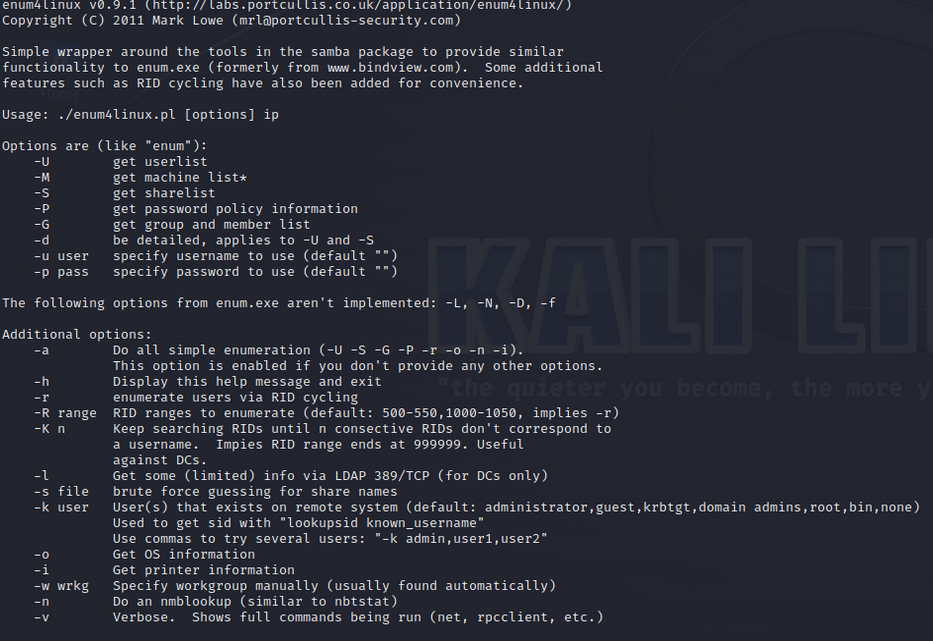
*Figure 3. Screenshot highlighting the help pages provided with enum4linux.*
As you can see from the help pages, there are a lot of different options we have access to when using enum4linux. We will run through each of these options individually to get a better understanding of their usability. The only thing you need to follow along is your own virtual machine running Kali and access a vulnerable machine such as Metasploitable or a box from TryHackMe. For this tutorial I will be using the Basic Pentesting box from TryHackMe which can be completed here. This is not a walkthrough of the box and merely showcases the section following the initial nmap scan results. But you are welcome to follow along at home. https://tryhackme.com/room/basicpentestingjt
Getting The User list.
The first option at our disposal is “-U” to get a list of the users who are listed on the target we are trying to enumerate from. To use this option we can type the following into the terminal.
enum4linux -U $IP_ADDRESS
If unsuccessful, we can use the “-r” option instead. This option will use a method known as RID Cycling to brute force the users. To use the RID cycling mode:
enum4linux -r $IP_ADDRESS
What is RID Cycling?
An RID or Relative Identifier is a hexadecimal identifier that is unique. It is used by Windows Server to keep track of objects and identify them. (HackTricks, 2023) Anytime a new user object is added to a domain, the Security Identifier or SID is combined with the RID to create a unique value for this object. The issue here is that RIDs are sequential, so it is possible to brute force these identifiers using this technique. (Microsoft, 2023).
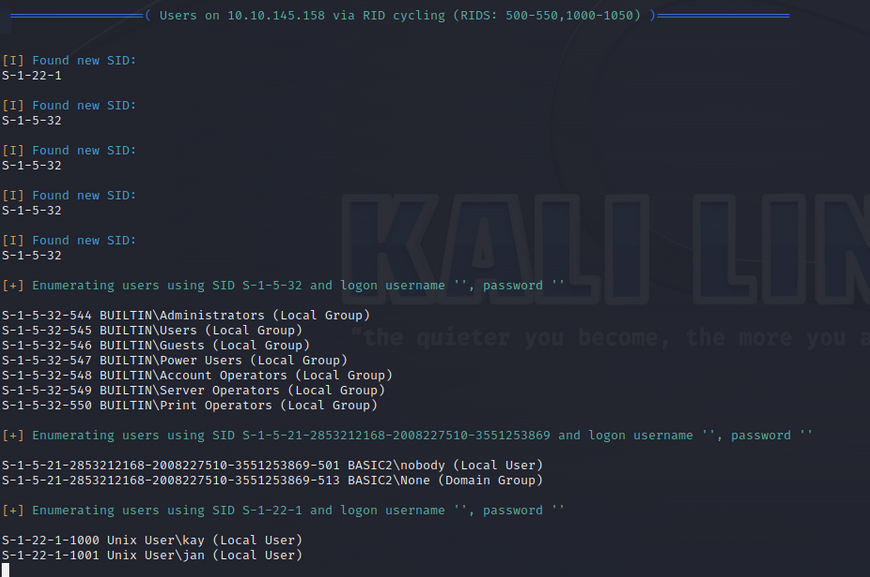
*Figure 4 Result of using RID cycling to extract user information from target.*
After running this command, we can see that enum4linux has found several Security Identifiers on the target system. Then using the technique of RID cycling, it has located two Unix users known as kay and jan.
Enumerating Password Policy Information.
Next up, we have the password policy option on enum4linux. To use this option, we can use the flag “-P” as seen on the help pages.
enum4linux -P $IP_ADDRESS
This option will give us details on any password policies active on the domains associated with the target IP address we inserted. The password policy information we receive can be incredibly useful in the later stages of a penetration test, if we need to brute force any passwords, we can adjust our settings to better match the requirements set by the server when a new password is created. This can help avoid detection and reduce the computing power required to gain entry.
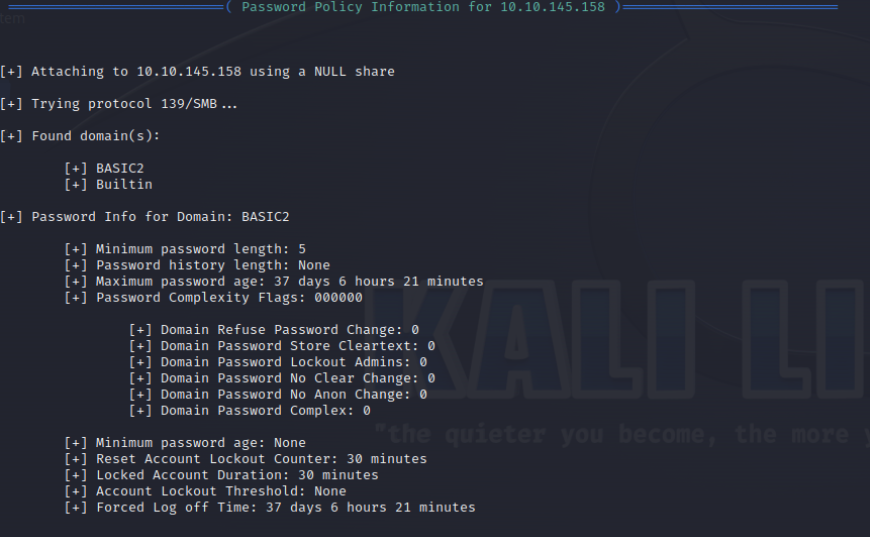
*Figure 5. Output from enum4linux using password policy option.*
After running the command, we can see the following output information. For the domain on the IP address we provided, there is a password policy containing a minimum password length of 5, a maximum password age of 37 days, 6 hours, and 21 minutes. It is also clear that there is no Account Lockout Threshold active. This indicates to us that if we were to brute force a password using a tool such as Hydra, we could have as many attempts as we like without the risk of being locked out.
Enumerating Share Information.
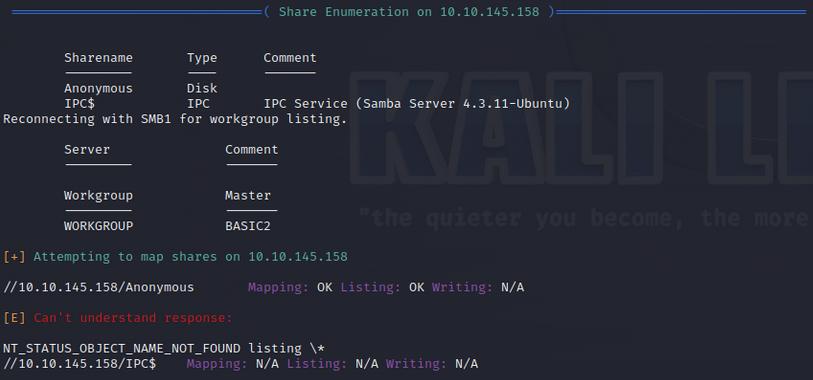
*Figure 6. Output from share enumeration setting on enum4linux.*
The share enumeration option on enum4linux returns all the shares (files and folders) on the target system. This includes default or administrative shares such as the IPC share, which is responsible for handling inter-program communication. (NetApp, 2023) We can also see another share called Anonymous which is a disk type share. This could contain useful folders and files that may produce valuable information or data in a penetration test. To use this option:
enum4linux -S $IP_ADDRESS
Extracting Printer Information.
This option is self-explanatory. It detects if there are any printers connected to the target network. In this example, we can see that there are no printers connected. Some printers can be misconfigured to expose their administrative panels or a simple Denial of Service (DoS) attack could render a businesses ability to print documents useless.

*Figure 7. Output of running printer information option on enum4linux.*
Finding Operating System Information.
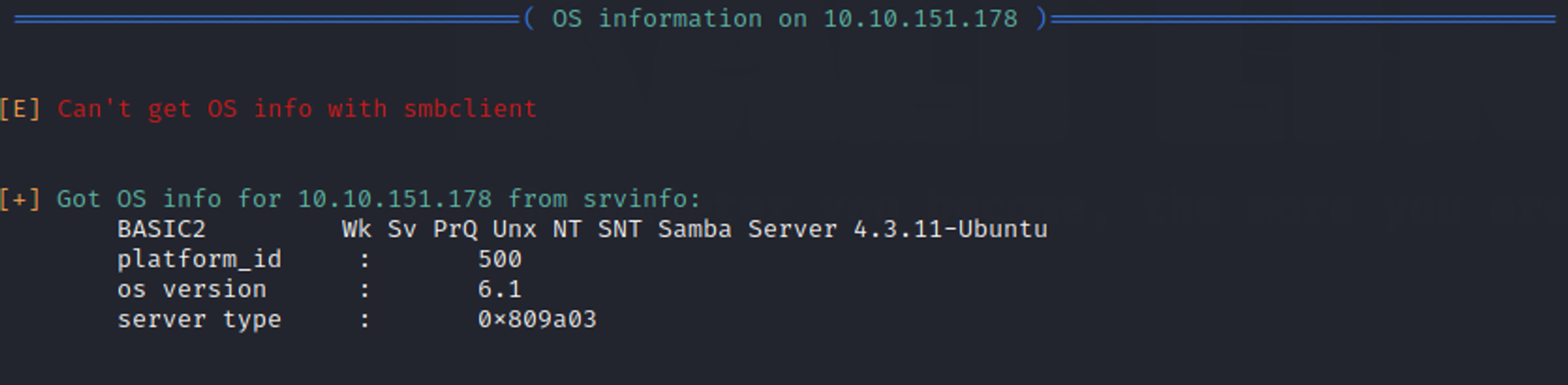
*Figure 8. Output of running OS information setting on enum4linux.*
Although if we are running enum4linux we are aware that the Operating System of the target will probably be a Samba server or Windows Server. It can be important to get more information about the version or type exactly. This information can highlight outdated or misconfigured network settings that can be exploited in the later stages of a penetration test.
enum4linux -o $IP_ADDRESS
When we run the OS Detection option, enum4linux uses two different methods to retrieve this information. One using smbclient and one using srvinfo. In the example given smbclient was unsuccessful in finding any information for us so enum4linux switched to srvinfo, which provides information on system processes. It is possible to use other tools such as Nmap to retrieve OS information. In a scenario where we are not sure what our target is, using Nmap to enumerate this information would be the best method. We would see then what is running on the target and focus our tools for enumerating further, by using a tool such as enum4linux to do so.
In Conclusion.
After reading through this tutorial, you should feel more comfortable using enum4linux to perform enumeration and reconnaissance during the initial phase of a penetration test. Performing overall or specific type enumeration depending on the types of information you’re trying to retrieve will produce a lot of important data and information about Windows Server and Samba systems. This data can help you understand the functionality of a specific target network and also provide details that can later be used to determine an avenue of exploitation. Hopefully, you can now see the value and the powerful nature of this tool and its uses in the industry.
References
Robert Sheldon. (no date), Server Message Block protocol (SMB Protocol) TechTarget [Accessed on 2nd December 2023] https://www.techtarget.com/searchnetworking/definition/Server-Message-Block-Protocol
Samba. (no date), Samba Homepage Samba.org [Accessed on 2nd December 2023] https://www.samba.org/samba/
Kali. (November 24, 2023), enum4linux [Accessed on 2nd December 2023] https://www.kali.org/tools/enum4linux/
Cyril (January 25, 2023), COMPREHENSIVE GUIDE TO PENETRATION TESTING (SECURITY TESTING), SecureTriad. **[Accessed on 2nd December 2023] https://securetriad.io/penetration-testing/
HackTricks (September 03, 2023), rpcclient enumeration [Accessed on 2nd December 2023] https://book.hacktricks.xyz/network-services-pentesting/pentesting-smb/rpcclient-enumeration
Microsoft (September 09, 2023), Security Identifiers [Accessed on 2nd December 2023] https://learn.microsoft.com/en-us/windows-server/identity/ad-ds/manage/understand-security-identifiers
NetApp (January 01, 2023) What the default administrator shares are. [Accessed on 3rd December 2023] https://docs.netapp.com/us-en/ontap/smb-admin/default-administrative-shares-concept.html
Computer Misuse Act 1990 c. 18 Available at: https://www.legislation.gov.uk/ukpga/1990/18/contents [Accessed on 3rd December 2023]